



Looking Back at Windows 7: Microsoft’s Redemption OS
Why Windows 7 Remains One of Microsoft’s Most Loved Operating Systems
Released in October 2009, Windows 7 was Microsoft’s answer to the heavily criticised Windows Vista. Designed to be faster, more stable, and more user-friendly, Windows 7 quickly became the go-to choice for both home and business users worldwide. With over 100 million copies sold within six months, it’s no wonder this operating system still holds a nostalgic place in tech history.
What Made Windows 7 a Standout Success?
While not radically different in appearance from Vista, Windows 7 introduced a suite of practical improvements, including faster boot times, improved hardware support, and a cleaner user interface. Microsoft learned from its mistakes and focused on creating a more responsive and intuitive experience.
System Requirements Comparison: Windows Vista vs Windows 7
- Processor: 1GHz or faster (same for both)
- RAM: 1GB (same)
- Hard Drive Space: 16GB (Vista required 15GB)
Despite similar hardware needs, Windows 7 dramatically outperformed Vista in real-world tests. In boot time comparisons, Windows 7 loaded into a working desktop and browser in just 45 seconds, compared to over a minute for Vista.
Key Pros of Windows 7
- Faster and smoother boot times
- Clean and reimagined taskbar
- Improved system stability and compatibility
- Significant boost in gaming performance
- Much easier to install and set up
Drawbacks to Consider
- Lacks some advanced customisation options
- May not perform well on very old hardware (Windows XP was still better for legacy systems)
Interesting Facts About Windows 7
- Fastest-selling OS: Windows 7 sold over 240 million licenses in its first year, making it the fastest-selling operating system at the time.
- Enduring popularity: Even after support ended in 2020, millions of users worldwide continued using Windows 7 due to its stability and familiarity.
- XP Mode: Windows 7 Professional, Enterprise, and Ultimate editions included a special “XP Mode” to help users run older applications inside a virtual Windows XP environment.
- Taskbar overhaul: Windows 7 introduced “jump lists” and full icon-only taskbars for the first time—features now considered standard.
- Touchscreen support: It was the first Microsoft OS to include native multi-touch support, paving the way for modern touchscreen laptops and tablets.
Most Famous Windows 7 Machine
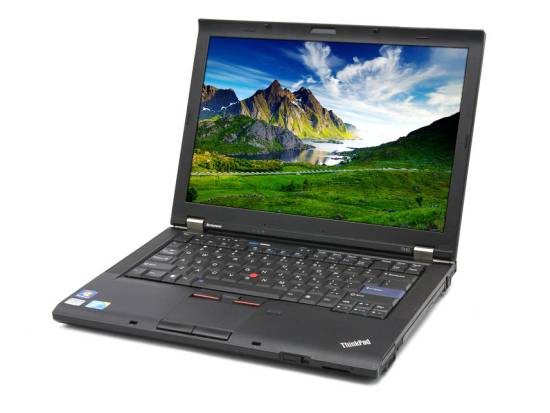
One of the most iconic machines to run Windows 7 was the Lenovo ThinkPad T410. Designed for business professionals, it offered outstanding reliability, build quality, and seamless compatibility with Windows 7 Professional. Many IT departments around the world adopted the T410 as a standard-issue laptop due to its:
- Durable magnesium alloy build
- Excellent keyboard and TrackPoint
- Strong performance with Intel Core i5 and i7 processors
- Easy maintenance and upgradability
- Exceptional compatibility with Windows 7 drivers and business software
Even today, refurbished ThinkPad T410 models are sometimes used by hobbyists and retro computing fans to relive the golden age of Windows 7.
Final Thoughts
Windows 7 wasn’t perfect, but it was a solid and highly usable operating system that restored faith in Microsoft’s ability to listen and evolve. Many users skipped Vista altogether and upgraded straight from Windows XP to Windows 7. Even today, it’s fondly remembered for its reliability, performance, and simplicity.
Originally Published by The Original PC Doctor on 1/4/2009. Updated for 2025.
FAQs About Windows 7
Is Windows 7 still supported by Microsoft?
No. Microsoft officially ended support for Windows 7 on January 14, 2020. This means there are no more security updates or patches, making it vulnerable to modern threats.
Can I still use Windows 7 in 2025?
Yes, but it’s not recommended. Without official support, your system is at higher risk of malware and cyberattacks. If you must use it, ensure you’re running offline or in a secure environment.
What was better in Windows 7 compared to Vista?
Windows 7 improved performance, stability, driver compatibility, and introduced a more intuitive taskbar. It also reduced the hardware strain that made Vista sluggish on many systems.
Which version of Windows replaced Windows 7?
Windows 8 was the direct successor to Windows 7, released in 2012. It got mixed reviews. Many users chose to wait for Windows 10. This version launched in 2015 and offered a more traditional desktop experience.
Check out the official Microsoft Support Page for Windows 7
https://learn.microsoft.com/lifecycle/products/windows-7
p>Originally Published by The Original PC Doctor on 01/04/2009. Updated for 05/07/2025.






















































































