



Liquid Cooling Support & Troubleshooting Services
Expert AIO Cooler & Custom Water Cooling Repair Across Australia
Call: 1300 723 628 | Book Liquid Cooling Service
Professional Liquid Cooling Diagnosis & Repair
At The Original PC Doctor, we specialize in diagnosing and repairing liquid cooling systems for gaming PCs, workstations, and high-performance computers. Whether you’re experiencing AIO pump failures, coolant leaks, rising temperatures, strange noises, or complete cooling system failures, our 24 years of experience ensures accurate diagnosis and effective solutions.
We service all types of liquid cooling systems including All-In-One (AIO) coolers from Corsair, NZXT, Cooler Master, Arctic, ASUS, and custom water cooling loops with EK, Alphacool, Bitspower, and Thermaltake components. Our technicians understand the complexities of liquid cooling and can troubleshoot issues that would stump typical repair shops.
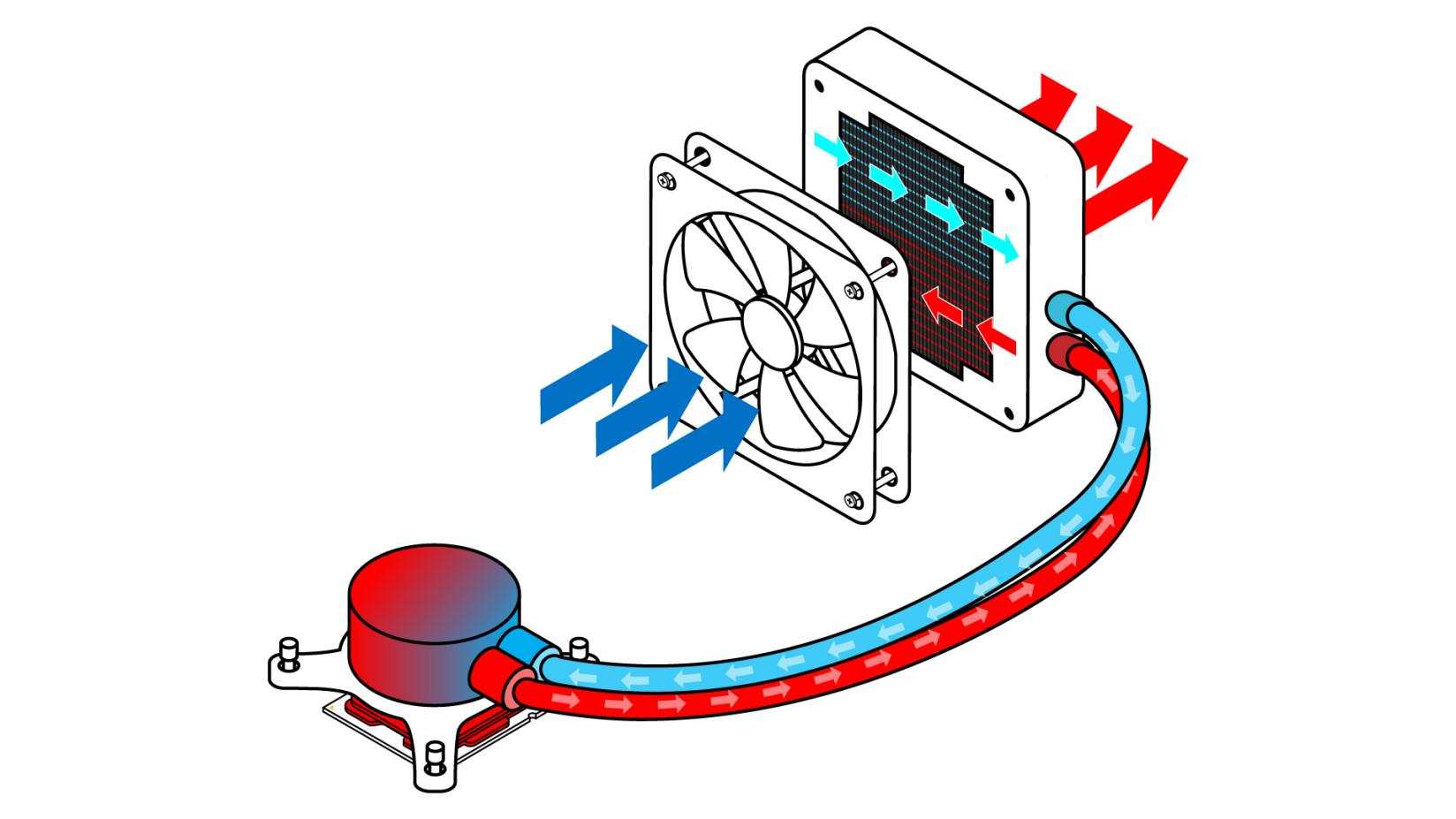
liquid cooling cpu process 1.jpg.rendition.intel .web .1648.927 1
Common Liquid Cooling Problems We Fix
AIO Pump Failure – Not Spinning or Making Noise
Symptoms: CPU temperatures rapidly climbing to 90-100°C, pump not spinning visible through transparent housing, grinding or rattling noise from pump block, BIOS showing pump RPM at 0 or fluctuating, system shutting down from thermal protection.
Causes: Bearing wear after 3-5 years of operation, pump motor failure from electrical issues or manufacturing defects, debris blocking impeller, air lock preventing pump operation, power connector failure or insufficient power delivery from motherboard header.
Our Solutions: We diagnose pump failure using thermal imaging and vibration analysis. If pump motor has failed, we recommend AIO replacement with premium models offering 6-year warranties. For air lock issues, we perform pump purging and repositioning. Power delivery problems are resolved through header testing and alternative power routing. We provide same-day replacement installation with proper mounting and thermal paste application.
Prevention: Regular monitoring of pump RPM through BIOS or software, annual inspection for bearing noise changes, proper case orientation to prevent air accumulation in pump, using quality power connections, upgrading aging AIOs before complete failure.
Rising CPU Temperatures Despite Working Pump
Symptoms: Gradual temperature increases over weeks or months, CPU reaching 85-95°C under load where it previously stayed at 65-75°C, pump RPM showing normal, fans spinning properly, thermal throttling during gaming or intensive workloads.
Causes: Coolant evaporation reducing liquid volume (permeation through tubing), air bubble accumulation in radiator or pump reducing heat transfer efficiency, degraded thermal paste between CPU and cold plate creating thermal resistance, dust buildup on radiator fins blocking airflow, failing pump bearings reducing flow rate despite spinning.
Our Solutions: Thermal imaging reveals if issue is mounting-related or coolant-related. For coolant loss, AIO replacement is required as they’re sealed units. Air bubbles are purged through repositioning and tilting techniques. Thermal paste is replaced with premium Thermal Grizzly Kryonaut or Noctua NT-H2. Radiators are thoroughly cleaned using compressed air and specialized tools. Pump flow rate is tested and weak pumps are replaced. Radiator fan configuration is optimized for maximum airflow.
Prevention: Monitor temperatures monthly, clean radiator every 3-6 months, replace thermal paste every 2 years, maintain positive case pressure to reduce dust, upgrade AIO every 5-6 years before coolant loss becomes significant.
Coolant Leaks From AIO or Custom Loop
Symptoms: Visible liquid around pump block or fittings, discolored spots on motherboard or GPU, system instability or random shutdowns, corrosion visible on components, sweet smell near PC (from glycol-based coolants), moisture condensation inside case.
Causes: Perished rubber tubing on aging AIOs (typically 5+ years old), loose compression fittings on custom loops, cracked acrylic reservoir or GPU waterblock, punctured radiator from improper installation or shipping damage, degraded O-rings in pump or fittings, excessive pressure from overfilling.
Our Solutions: We perform complete leak detection using UV dye and blacklight inspection for custom loops. Damaged components are identified through pressure testing. For AIO leaks, immediate shutdown and component protection is priority, followed by warranty claim assistance or replacement. Custom loop repairs include fitting tightening, O-ring replacement, tube replacement with premium EPDM or PVC tubing, and complete system flushing. Affected components undergo cleaning and testing for liquid damage. We provide leak testing for 24-48 hours before returning systems.
Prevention: Annual inspection of all fittings and tubing, use quality compression fittings (Bitspower, EK, Barrow), replace soft tubing every 2-3 years, maintain proper coolant levels, use leak detection additives in custom loops, pressure test after any maintenance.
Air Bubbles and Gurgling Noises
Symptoms: Gurgling, bubbling, or sloshing sounds from pump or radiator, intermittent temperature spikes when bubbles pass through pump, visible air movement through transparent pump housing or reservoir, high-pitched whining that comes and goes, reduced cooling performance during certain PC orientations.
Causes: Insufficient coolant fill level in custom loops, improper AIO installation with pump mounted higher than radiator, air trapped during initial filling, coolant evaporation creating air pockets, pump cavitation from running dry, improper bleeding procedure after filling.
Our Solutions: For AIOs, we reposition the radiator above the pump (top or front mount with tubes down) following manufacturer specifications. Gentle tilting and rocking while running helps air migrate to radiator. For custom loops, we add coolant to reservoir, bleed system through designated ports, run pump at low speed during filling, and tilt case through multiple orientations while purging. Severe cases require complete drain and refill with proper bleeding procedure. We verify elimination through extended testing and noise monitoring.
Prevention: Mount AIO radiators correctly (pump never highest point), fill custom loops slowly with bleeding cycles, use quality coolants with low air retention, top up reservoir monthly, avoid rapid pump speed changes, install fill/drain ports for easy maintenance.
Clogged Radiator or Waterblock
Symptoms: Dramatic temperature increase across all cooled components, reduced flow rate visible in flow meter or pump performance, one component running hot while others are normal, discolored coolant with particles or sludge, pump working harder (higher RPM) with less cooling effect.
Causes: Biological growth from using distilled water without biocide, corrosion from mixing incompatible metals (aluminum and copper), degraded coolant leaving deposits, external dust blocking radiator fins, manufacturing residue not flushed before filling, using colored coolants that separate and clog over time.
Our Solutions: External radiator cleaning with compressed air and fin combs. Internal blockage requires system disassembly, component flushing with distilled water and vinegar solution for light buildup, or specialized radiator cleaning solutions (Mayhems Blitz) for severe cases. Waterblocks are disassembled and manually cleaned. If corrosion damage is severe, component replacement is necessary. System is refilled with quality premix coolant (EK Cryofuel, Corsair XL5) and proper biocide. Flow testing confirms restoration of proper circulation.
Prevention: Use quality premix coolants with biocides, never mix coolant types, flush system before filling, change coolant every 12-18 months, avoid colored coolants for long-term reliability, use all-copper or all-aluminum components (no mixing), clean external radiator surfaces quarterly.
RGB or Software Control Issues
Symptoms: RGB lighting not working on pump head or fans, software unable to detect AIO, pump speed locked at maximum or minimum, temperature monitoring showing incorrect readings, fan curves not applying, USB connection errors in device manager.
Causes: Corrupted software installation, USB 2.0 header connection loose or damaged, driver conflicts with other RGB software, motherboard USB power issues, firmware outdated on AIO controller, Windows updates breaking compatibility, multiple RGB software packages conflicting.
Our Solutions: Complete software troubleshooting including driver reinstallation, firmware updates via manufacturer tools, USB header testing and alternative header connection, resolving conflicts between Corsair iCUE, NZXT CAM, Asus Aura, MSI Dragon Center, etc. We ensure proper power delivery through 9-pin USB headers, configure pump curves for optimal performance, and verify temperature sensor accuracy. RGB synchronization is restored through proper software configuration and header management.
Prevention: Keep AIO software updated, limit RGB control to one primary software, document USB header assignments, use quality USB extension cables if needed, regularly check for firmware updates, maintain stable Windows installation.
Custom Loop Not Holding Pressure
Symptoms: Coolant level dropping in reservoir over days or weeks, air continuously appearing in loop, pressure gauge showing loss over time, system requiring frequent refilling, slight moisture around fittings without obvious leak.
Causes: Microscopic leaks at compression fittings, O-ring imperfections allowing slow seepage, tube not fully seated in fitting, cracked acrylic under stress, permeable tubing material allowing evaporation, improper torque on compression fittings (too loose or overtightened damaging O-rings).
Our Solutions: Professional pressure testing at 0.5-0.7 bar using leak tester equipment. UV dye injection under blacklight reveals microscopic leaks invisible to naked eye. Every fitting is inspected and retightened to proper torque specifications. Damaged O-rings are replaced with quality Viton or EPDM versions. Tubes are recut and properly seated. Cracked components are replaced. After repairs, 24-hour pressure test confirms seal integrity before refilling with coolant.
Prevention: Use torque wrench for compression fittings, inspect O-rings before installation, ensure tube cuts are perfectly square, use quality tubing (PrimoChill, EK ZMT), avoid acrylic components in high-stress positions, pressure test annually, maintain proper coolant levels to reduce air ingress.
AIO Cooler Specific Troubleshooting
Corsair iCUE AIO Issues
Common Problems: iCUE software not detecting AIO, pump commander core connection failures, RGB not syncing, excessive pump noise, temperature reading errors in software.
Solutions: Commander Core firmware updates, USB 2.0 header troubleshooting, software reinstallation with clean uninstall using CCleaner, resolving conflicts with other Corsair devices, pump curve optimization, RGB configuration restoration, warranty support coordination for hardware failures.
NZXT Kraken AIO Issues
Common Problems: CAM software performance issues, pump display not working, USB device not recognized errors, fan speed fluctuations, LCD screen frozen or displaying incorrect information.
Solutions: CAM software cleanup and reinstallation, USB controller driver updates, alternative USB header connection testing, pump firmware flashing, LCD screen cable reseating, fan curve configuration, Windows power management adjustment to prevent USB selective suspend.
Cooler Master MasterLiquid Issues
Common Problems: MasterPlus software detection failures, pump ARGB not functioning, unusual pump noises, CPU temperature spikes, mounting bracket compatibility issues with AM5 or LGA1700.
Solutions: MasterPlus software configuration, ARGB header connection verification (5V vs 12V), pump bearing inspection and lubrication if possible, mounting bracket upgrades for new sockets, proper installation pressure verification, thermal paste reapplication.
Arctic Liquid Freezer II Issues
Common Problems: VRM fan not spinning, excessive pump noise, mounting system difficulties, no PWM control over fans, radiator fan imbalance.
Solutions: VRM fan power connection troubleshooting, pump bearing assessment, mounting hardware adjustment for proper tension, PWM signal troubleshooting at motherboard header, fan replacement if bearing failure detected, verification of proper installation per Arctic specifications.
ASUS ROG Ryujin / Ryuo Issues
Common Problems: OLED display not working, Aura Sync RGB failures, embedded fan controller issues, high pump noise levels, ASETEK pump detection problems.
Solutions: Armoury Crate software configuration, OLED firmware updates, Aura Sync troubleshooting and driver management, embedded controller reset procedures, pump noise assessment and warranty claim if defective, USB connectivity optimization.
Custom Water Cooling Loop Support
Complete Custom Loop Planning & Design
We provide expert consultation for custom water cooling builds including component selection, loop order optimization, tubing routing, reservoir placement, radiator sizing calculations, pump head pressure requirements, and thermal capacity planning. Our designs ensure proper flow rates, adequate cooling capacity, and aesthetic appeal while maintaining serviceability.
Custom Loop Installation Service
Professional installation of complete custom loops including CPU blocks, GPU blocks, radiators (120mm-480mm), pumps (D5, DDC), reservoirs, compression fittings, tubing (soft or hard), coolant filling, bleeding, and leak testing. We handle complex configurations including dual loops, parallel vs series setups, distribution plates, and multi-GPU systems.
Loop Maintenance & Coolant Changes
Annual or bi-annual maintenance including complete system drain, component disassembly and cleaning, waterblock inspection, radiator flushing, O-ring inspection and replacement, fresh coolant refill with quality premix, system bleeding, and 24-hour leak testing. We document coolant condition and provide recommendations for future maintenance intervals.
Component Upgrades & Modifications
Adding new components to existing loops (new GPU waterblock, additional radiators, reservoir upgrades), flow rate optimization, pump upgrades for improved performance, hard tubing conversions from soft tube, RGB integration, temperature sensor additions, and flow meter installation.
Performance Optimization
Loop efficiency analysis using thermal imaging, flow rate measurement and optimization, radiator fan configuration testing, pump speed curve tuning, identifying restrictions in loop, coolant temperature monitoring setup, and component repositioning for improved cooling.
Liquid Cooling Maintenance Services
6-Month AIO Inspection (Free with Service)
- Visual inspection for leaks or damage
- Pump noise assessment and RPM verification
- Radiator fan operation and cleaning
- Temperature monitoring and comparison to baseline
- Mounting security check
- Software/firmware updates if applicable
- Documentation of coolant condition (if visible)
Annual AIO Service ($99-$149)
- Complete visual inspection and documentation
- Thermal paste replacement with premium compound
- Radiator deep cleaning (internal and external)
- Fan bearing inspection and replacement if needed
- Pump performance testing and flow verification
- Pressure testing (if pump accessible)
- RGB and software functionality verification
- Temperature benchmarking and optimization
- Mounting hardware inspection and retightening
Custom Loop Maintenance ($199-$399)
- Complete system drain and disassembly
- Waterblock cleaning and inspection (CPU/GPU/monoblock)
- Radiator internal flushing with cleaning solution
- Pump disassembly, cleaning, and bearing inspection
- Reservoir cleaning and O-ring replacement
- Fitting inspection and retightening
- Fresh coolant refill (premium coolant included)
- Complete system bleeding and air removal
- 24-hour leak testing and pressure verification
- Performance benchmarking and documentation
Emergency Leak Response (Same-Day Available)
- Immediate system shutdown and power disconnection
- Coolant containment and cleanup
- Component inspection for liquid damage
- Cleaning and drying of affected components
- Testing of motherboard, GPU, RAM, storage
- Leak source identification and documentation
- Repair recommendations and warranty assistance
- System restoration or temporary cooling solution
Liquid Cooling Performance Optimization
Temperature Reduction Services
Thermal Paste Upgrade: Replacing stock thermal paste with premium compounds (Thermal Grizzly Kryonaut, Noctua NT-H2, Arctic MX-5) typically reduces CPU temperatures by 3-8°C. For extreme cooling, liquid metal application (Thermal Grizzly Conductonaut) can provide 8-15°C reduction on CPUs.
Radiator Optimization: Proper fan configuration (push vs pull vs push-pull), fan quality upgrades (Noctua, Arctic P-series), and radiator positioning can reduce coolant temperatures by 5-10°C. We calculate optimal radiator surface area for your heat load.
Flow Rate Improvements: Pump upgrades from DDC to D5, reducing loop restrictions, optimizing tubing diameter, and minimizing 90° bends can increase flow rate by 30-50%, improving overall cooling efficiency by 3-7°C.
Noise Reduction
Pump noise reduction through vibration dampening mounts, optimal pump speed settings, and proper reservoir placement. Fan noise optimization using quality low-RPM fans, custom fan curves, and sound-dampening case materials. We achieve whisper-quiet operation (<30dB) while maintaining excellent cooling performance.
RGB and Aesthetic Enhancement
Professional RGB integration including synchronized lighting across pump, fans, reservoir, and case. Custom coolant colors using UV-reactive or opaque coolants. Hard tubing installations for show-quality builds. Custom cable management to showcase water cooling components.
Why Choose The Original PC Doctor for Liquid Cooling?
24 Years of Experience
Since 2001, we’ve serviced thousands of liquid-cooled systems from simple AIOs to complex custom loops. Our technicians understand the engineering principles behind liquid cooling and can diagnose issues that stump typical repair shops.
Professional Equipment & Tools
We use professional leak testers, pressure gauges, flow meters, thermal imaging cameras, and specialized tools for safe disassembly and maintenance. Our workshop is equipped for major custom loop work including tube cutting, bending equipment, and leak testing stations.
All Brands & Configurations
We service all liquid cooling brands: Corsair, NZXT, Cooler Master, Arctic, ASUS, MSI, Thermaltake, EK Water Blocks, Alphacool, Bitspower, Aquacomputer, Watercool, XSPC, Hardware Labs, Barrow, and more. From compact AIOs to extreme custom loops with multiple radiators and components.
Same-Day Emergency Service
Coolant leaks are emergencies requiring immediate response. We offer same-day service across Melbourne and rapid response (24-48 hours) across Australia for critical liquid cooling failures. Our mobile technicians can attend your location to minimize downtime.
Genuine Parts & Premium Coolants
We use only genuine replacement parts and premium coolants (EK Cryofuel, Corsair XL5, Mayhems X1, Aquacomputer DP Ultra) to ensure reliability and longevity. No cheap alternatives that risk your expensive components.
Comprehensive Warranty
All repairs and installations include warranty coverage. Custom loop installations receive 12-month warranty on workmanship. We stand behind our work and use quality components that last.
Transparent Pricing
Detailed quotes before work begins. No hidden fees. Clear breakdown of parts, labor, and coolant costs. Most AIO repairs $99-$299. Custom loop maintenance $199-$399. Emergency leak response from $149.
Liquid Cooling Brands We Service
AIO Cooler Manufacturers
- Corsair: iCUE Elite, Capellix, Platinum, RGB PRO series
- NZXT: Kraken X, Z series, Elite RGB
- Cooler Master: MasterLiquid ML, PL, Illusion series
- Arctic: Liquid Freezer II, Liquid Freezer III
- ASUS ROG: Ryujin, Ryuo, Strix LC series
- MSI: MAG CoreLiquid, MEG CoreLiquid
- Thermaltake: TH, Water 3.0, Floe series
- Deepcool: LT, LS, AK, Mystique series
- EVGA: CLC series
- Fractal Design: Lumen, Celsius+ series
- be quiet!: Silent Loop, Pure Loop
- Lian Li: Galahad series
Custom Loop Component Manufacturers
- EK Water Blocks: CPU blocks, GPU blocks, radiators, reservoirs, D5/DDC pumps
- Alphacool: NexXxoS radiators, Eisblock waterblocks, Eisbaer AIO
- Corsair Hydro X: XC7 CPU blocks, XG7 GPU blocks, XR radiators
- Thermaltake: Pacific series blocks, radiators, fittings
- Bitspower: Premium fittings, reservoirs, GPU blocks
- Aquacomputer: High-end blocks, D5 Next pumps, Aquaero controllers
- Hardware Labs: Black Ice, GTS, GTX, GTR radiators
- Watercool: Heatkiller blocks, MO-RA radiators
- XSPC: Raystorm blocks, TX/EX radiators
- Barrow: Budget-friendly blocks, fittings, radiators
DIY Liquid Cooling Troubleshooting Guide
Quick Diagnostic Steps You Can Try
High CPU Temperatures:
- Check pump is spinning (visible through housing or RPM in BIOS)
- Verify fans are running at appropriate speeds
- Ensure radiator isn’t clogged with dust (blow compressed air through)
- Touch tubes near pump – one should be warm (in) one cool (out)
- Reboot and check BIOS for pump detection
- Update AIO control software and firmware
Pump Making Noise:
- Reposition PC to different angle – if noise stops, it’s air bubbles
- Run PC for 24 hours with pump at 100% to help air escape
- If grinding noise, pump bearings may be failing – replacement needed
- Check pump isn’t mounted as highest point in system
- Ensure pump power cable is fully connected
No RGB Lighting:
- Check USB 2.0 header connection to motherboard
- Try different USB header if available
- Reinstall manufacturer control software
- Update motherboard USB drivers
- Disable Windows USB selective suspend in power options
Software Not Detecting AIO:
- Completely uninstall AIO software using Revo Uninstaller or similar
- Restart PC and reinstall latest version from manufacturer site
- Check Device Manager for USB device errors
- Try connecting to different USB 2.0 header
- Disable other RGB software that may conflict (Aura, iCUE, etc.)
When to Call a Professional
Contact The Original PC Doctor immediately if you experience:
- Any visible coolant leaks or moisture inside case
- CPU temperatures above 95°C or immediate thermal shutdowns
- Loud grinding or clicking from pump that doesn’t resolve
- Pump completely not spinning despite power connection
- Coolant discoloration or visible particles in AIO (if transparent)
- System instability, crashes, or unusual behavior after cooling issue
- Sweet smell near PC (glycol coolant leaking)
- Corrosion visible on any components
Liquid Cooling Frequently Asked Questions
How long do AIO coolers last?
Quality AIOs typically last 5-7 years with proper maintenance. Coolant slowly evaporates through rubber tubing over time (permeation), gradually reducing cooling performance. Pump bearings wear out after 40,000-60,000 hours of operation. Most manufacturers provide 5-6 year warranties. We recommend proactive replacement at 6 years to avoid sudden failures.
Can AIO coolers be refilled?
Most AIO coolers are sealed units not designed for refilling. Some models like Arctic Liquid Freezer II have fill ports but refilling voids warranty and risks introducing air bubbles. Custom water cooling loops are designed for regular maintenance and refilling. If your AIO needs refilling due to coolant loss, replacement is the recommended solution.
What causes AIO pump failure?
Main causes include bearing wear from continuous operation (3-7 years typical lifespan), running pump dry from coolant evaporation, manufacturing defects in motor or bearings, electrical issues from motherboard power delivery, and air locks preventing pump operation. Pumps spinning at maximum RPM 24/7 fail faster than those using proper curves.
How often should I change coolant in custom loop?
We recommend changing coolant every 12-18 months. Quality premix coolants with biocides last longer than distilled water with additives. Clear coolants last longer than colored ones which can separate and clog. Signs you need coolant change include discoloration, visible particles, biological growth, temperature increases, or reaching 18-month mark.
Is liquid cooling worth it?
For high-end CPUs (Intel i9, AMD Ryzen 9) and overclocking, liquid cooling provides superior performance over air cooling. 280mm+ AIOs cool better than large tower air coolers while being quieter. Custom loops excel for multi-component cooling (CPU+GPU+VRM). For mid-range CPUs, quality air cooling is sufficient and more reliable.
Can liquid cooling leak and damage my PC?
Modern AIOs rarely leak if properly installed and maintained. Manufacturing defects occur in <1% of units. Custom loops have higher risk if improperly assembled but with quality components and proper installation, leaks are uncommon. We recommend annual inspections, quality components, and proper installation to minimize risk. Leak detection additives provide early warning.
Why is my AIO making gurgling noises?
Gurgling indicates air bubbles in the system. Common causes: pump mounted higher than radiator (incorrect installation), coolant evaporation creating air pockets, insufficient coolant from factory, or air trapped during manufacturing. Solution: reposition radiator above pump, run pump at 100% for 24 hours, gently tilt PC to help air migrate. If persistent, AIO may need replacement.
What temperature is normal for liquid cooling?
With quality AIO or custom loop: CPU idle 30-40°C, gaming/light load 50-65°C, full load (stress test) 65-80°C. High-end CPUs (i9-14900K, Ryzen 9 7950X) may reach 80-90°C under sustained all-core load even with excellent cooling. GPU with waterblock: idle 25-35°C, gaming 45-60°C, full load 60-75°C. Coolant temperature typically stays 30-45°C.
How much does liquid cooling repair cost?
AIO troubleshooting and minor repairs: $99-$149. AIO replacement with installation: $199-$499 depending on model. Custom loop leak repair: $149-$399. Complete custom loop maintenance: $199-$399. Emergency leak response: $149-$299. Major custom loop rebuild: $499-$999+. All prices include labor, we provide detailed quotes before proceeding.
Do you offer warranty on repairs?
Yes. AIO installation and repairs include 90-day warranty on workmanship. Custom loop installations receive 12-month warranty on assembly quality (excluding component failures covered by manufacturer warranty). Emergency repairs include 30-day warranty. We use quality parts and stand behind our work.
Contact The Original PC Doctor for Liquid Cooling Support
Expert diagnosis and repair for all liquid cooling issues.
Don’t risk expensive component damage from cooling failures. Our experienced technicians provide fast, professional liquid cooling repair and maintenance services across Australia.
Phone: 1300 723 628
Book Online: Schedule Liquid Cooling Service
Our Services:
- AIO cooler troubleshooting and repair
- Custom water cooling loop support
- Emergency leak response (same-day available)
- Coolant changes and maintenance
- Performance optimization
- Component upgrades and modifications
- Complete custom loop design and installation
- All brands and configurations serviced
Service Areas:
- Melbourne (same-day service available)
- Sydney, Brisbane, Perth, Adelaide
- All Australian states and territories
- Mobile onsite service
- Workshop service available
About The Original PC Doctor
The Original PC Doctor has been Australia’s trusted computer repair and custom PC specialist since 2001. With 24 years of experience, we’ve evolved alongside cooling technology from early water cooling experiments to modern AIOs and sophisticated custom loops. Our technicians have serviced thousands of liquid-cooled systems and understand the engineering principles, common failure modes, and optimal configurations for reliable performance.
We invest in professional-grade diagnostic equipment including thermal imaging cameras, pressure testers, flow meters, and leak detection tools. Our workshop facilities accommodate complex custom loop work with dedicated leak testing stations and proper ventilation for coolant handling.
Whether you’re experiencing AIO pump failure, planning a custom loop build, dealing with coolant leaks, or need regular maintenance, The Original PC Doctor provides expert liquid cooling support backed by decades of experience and a commitment to quality service.
Call 1300 723 628 today or book online to schedule your liquid cooling service.






















































































