



Professional Thermal Imaging for Gaming PCs
Advanced Heat Analysis & Cooling Optimization
See The Heat Your Eyes Can’t Detect
At The PC Doctor, we use professional-grade thermal imaging technology to diagnose, analyze, and eliminate heat-related performance issues in gaming and high-performance PCs. Our thermal cameras reveal hidden hotspots, inefficient cooling paths, and heat soak problems that cause thermal throttling and reduced gaming performance.
Why thermal imaging matters: Modern gaming components can generate over 500 watts of heat. When cooling systems fail to manage this effectively, your expensive hardware throttles performance, reduces lifespan, and can lead to system instability. Our infrared analysis shows exactly where the problems are and how to fix them.
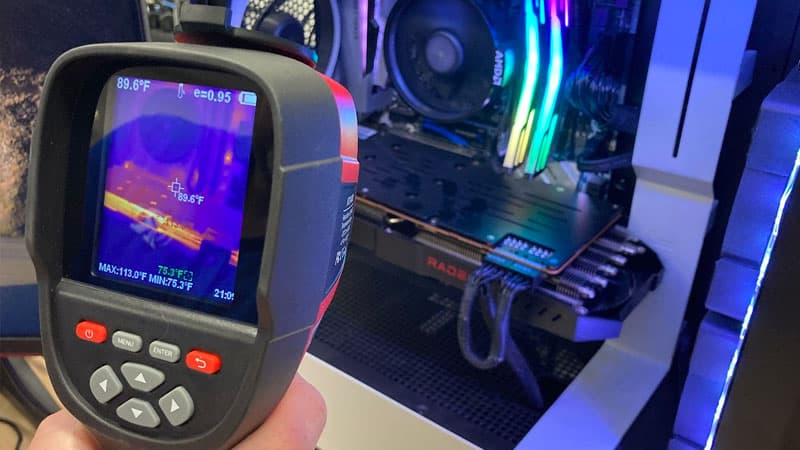
Thermal Imaging Camera
What Is PC Thermal Imaging?
Thermal imaging uses infrared cameras to visualize heat distribution across your PC components in real-time. While your eyes can’t see infrared radiation, our thermal cameras can detect temperature differences as small as 0.1°C, creating a color-coded heat map of your entire system.
Temperature Ranges We Monitor
- CPU: Idle 30-45°C, Gaming 60-80°C, Max safe 90°C
- GPU: Idle 30-50°C, Gaming 65-85°C, Max safe 95°C
- VRM: Should stay under 90°C, critical above 100°C
- M.2 NVMe: Optimal under 60°C, throttles above 80°C
- RAM: Should remain under 50°C for stability
- Chipset: Typically 50-70°C under load
Our thermal imaging cameras operate in the 7.5-14 micron infrared spectrum, detecting heat emissions from all PC components including CPUs, GPUs, VRMs, memory modules, storage drives, and power delivery systems. This allows us to identify thermal bottlenecks before they cause permanent damage or performance degradation.
Common Heat Problems We Diagnose
Heat Soak in Gaming Systems
Heat soak occurs when heat accumulates in your PC case faster than it can be expelled. This is particularly problematic in:
- Extended gaming sessions (2+ hours)
- Compact or poorly ventilated cases
- Systems with multiple high-wattage components
- Overclocked CPUs and GPUs running sustained workloads
- Multi-GPU configurations
Symptoms: Performance degradation over time, FPS drops after 30-60 minutes of gaming, system instability after warmup, increased fan noise as session progresses.
Thermal Throttling Detection
When components exceed their thermal limits, they automatically reduce clock speeds to prevent damage. Our thermal imaging reveals exactly which components are throttling and why:
- CPU Throttling: Often caused by inadequate cooler mounting pressure, dried thermal paste, or insufficient airflow
- GPU Throttling: Typically from insufficient case ventilation, blocked heatsink fins, or failed thermal pads
- VRM Throttling: Common in high-end CPUs with inadequate motherboard cooling
- SSD Throttling: M.2 drives can throttle by 50% or more when overheating
Hotspot Identification
Thermal imaging reveals localized heat concentrations that indicate problems:
- Uneven CPU cooler contact causing 15-20°C hotspots
- GPU memory junction temperatures exceeding 100°C
- VRM component temperatures approaching critical limits
- Capacitor overheating near power delivery systems
- PCIe slot heat accumulation affecting adjacent components
- Cable management blocking critical airflow paths
Cooling System Inefficiencies
Our thermal analysis identifies cooling system problems before they cause failures:
- Air-cooler mounting issues creating 10-25°C temperature deltas
- AIO pump failures or air bubble accumulation
- Case fan placement creating dead zones or recirculation
- Positive vs negative pressure imbalances
- Radiator positioning reducing cooling efficiency
- Thermal pad degradation on GPU memory and VRMs
Our Thermal Imaging Process
Step 1: Baseline Thermal Scan
We capture thermal images of your PC at idle to establish baseline temperatures for all major components. This reveals any abnormal heat patterns even before load testing begins.
Step 2: Stress Testing with Thermal Monitoring
Your system runs intensive workloads (gaming benchmarks, CPU stress tests, GPU torture tests) while we continuously monitor temperatures with thermal imaging. This reveals how heat builds up over time and identifies thermal saturation points.
Step 3: Component-Level Analysis
We examine individual components in detail: CPU die temperatures, GPU hotspots, VRM phases, memory modules, M.2 drives, chipsets, and power delivery circuits. Each component is assessed against manufacturer specifications and performance benchmarks.
Step 4: Airflow Pattern Analysis
Thermal imaging reveals airflow effectiveness by showing temperature gradients across components. We identify dead zones, recirculation patterns, and opportunities to improve cooling efficiency through better fan placement or case modifications.
Step 5: Heat Soak Testing
Extended stress testing (30-120 minutes) shows how your system handles sustained loads. We measure the rate of temperature increase, identify when thermal equilibrium is reached, and determine if heat soak causes performance degradation.
Step 6: Thermal Imaging Report
You receive thermal images showing temperature distributions, identified problem areas highlighted, comparative analysis against optimal temperatures, and detailed recommendations for cooling improvements with expected temperature reductions.
Step 7: Optimization Implementation
Based on our findings, we implement cooling solutions: remounting coolers with premium thermal paste, improving case airflow configuration, adding targeted cooling for specific hotspots, replacing degraded thermal pads, optimizing fan curves, or recommending hardware upgrades where necessary.
Step 8: Post-Optimization Verification
After implementing improvements, we perform another complete thermal imaging scan to verify temperature reductions, document performance improvements, and ensure all components now operate within optimal thermal ranges.
Benefits of Professional Thermal Analysis
Eliminate Performance Throttling
Identify and fix thermal bottlenecks that cause your CPU or GPU to reduce clock speeds. Many gaming systems lose 10-30% performance to thermal throttling without users realizing it.
Precision Problem Diagnosis
Stop guessing at cooling problems. Thermal imaging shows exactly which components are overheating, by how much, and why. This eliminates trial-and-error troubleshooting.
Prevent Hardware Damage
Excessive heat degrades component lifespan. GPUs, CPUs, and VRMs operating above safe temperatures can fail prematurely. Early detection prevents expensive replacements.
Optimize Cooling Efficiency
Discover which cooling improvements provide the best results. We show you temperature reductions from different fan configurations, cooler upgrades, or case modifications before you invest.
Maximize Overclocking Potential
Push your hardware further safely. Thermal imaging reveals thermal headroom for overclocking and shows which cooling upgrades enable higher stable clocks.
Validate Cooling System Performance
Verify your expensive AIO cooler or custom loop is working correctly. Thermal imaging detects pump failures, air pockets, poor mounting, and other issues that reduce cooling effectiveness.
When You Need Thermal Imaging
Gaming Performance Issues
- FPS drops or stuttering that worsen over gaming sessions
- Performance degradation after 30-60 minutes of play
- System instability or crashes during intensive gaming
- GPU or CPU throttling warnings in monitoring software
- Unexpectedly low benchmark scores compared to similar systems
System Symptoms
- Excessive fan noise or fans ramping to maximum speed
- System shutdowns during gaming or intensive workloads
- Case exterior feels unusually hot to touch
- Components showing high temperatures in monitoring software
- Recently upgraded hardware running hotter than expected
Preventive Maintenance
- Annual thermal checkup for high-performance gaming rigs
- Verification after building a new custom PC
- Validation before overclocking CPU or GPU
- Assessment after upgrading to higher-wattage components
- Testing new case or cooling system effectiveness
Professional Workstation Optimization
- Content creation systems running rendering workloads
- Streaming PCs with high sustained loads
- Video editing workstations with multiple drives and GPUs
- 3D modeling systems requiring consistent performance
- AI/ML development machines with prolonged GPU usage
Advanced Cooling Solutions We Implement
Component-Specific Cooling Upgrades
- CPU Cooling: Tower air coolers, 240-420mm AIO liquid coolers, custom loop integration, premium thermal compound application
- GPU Cooling: Upgraded aftermarket air coolers, GPU AIO brackets, VRAM and VRM thermal pad replacement, active backplate cooling
- VRM Cooling: Dedicated VRM heatsinks, active VRM fans, thermal pad upgrades for power delivery
- M.2 Cooling: Active M.2 coolers, passive heatsink upgrades, strategic placement for airflow
- Memory Cooling: RAM heatsink installation, directed airflow solutions for overclocked memory
Airflow Optimization
- Strategic fan placement creating optimal pressure balance
- High static pressure fans for restrictive cases
- High airflow fans for unrestricted intake/exhaust
- Fan curve optimization for noise vs cooling balance
- Cable management improving airflow paths
- Case modification for improved ventilation
Advanced Thermal Materials
- Premium Thermal Paste: Thermal Grizzly Kryonaut, Noctua NT-H2 (2-5°C improvement)
- Liquid Metal: Thermal Grizzly Conductonaut for extreme cooling (5-10°C improvement on CPUs)
- High-Performance Thermal Pads: Gelid GP-Extreme, Thermalright Odyssey (GPU VRAM and VRM)
- Thermal Putty: K5 Pro for irregular surfaces and chipsets
Case Studies: Real Results
RTX 4090 Gaming PC – Heat Soak Elimination
Problem: High-end gaming PC with RTX 4090 and i9-14900K experiencing severe performance drops after 45 minutes of gaming. GPU throttling from 2640MHz down to 2400MHz, CPU hitting 100°C regularly.
Thermal Imaging Findings: Heat accumulation in top chamber of case, VRM temperatures exceeding 105°C, poor airflow around GPU shroud, case exhaust insufficient for 650W+ system heat output.
Solutions Implemented: Added three 120mm exhaust fans in top panel, repositioned AIO to front intake, improved VRM cooling with dedicated heatsink and 40mm fan, optimized fan curves for all case fans, replaced GPU thermal pads with Gelid GP-Extreme.
Results: GPU sustained 2640MHz throughout 2+ hour gaming sessions, CPU temperatures reduced to 82°C peak, VRM temperatures now stable at 85°C, zero thermal throttling observed, 15% FPS improvement in prolonged benchmarks.
Content Creator Workstation – Multi-Component Optimization
Problem: Video editing workstation with dual GPUs for rendering experiencing system instability during long exports. GPU #2 reaching 95°C and throttling, M.2 drives throttling during large file transfers.
Thermal Imaging Findings: GPU #2 receiving minimal airflow due to GPU #1 blocking intake, M.2 drives directly under GPU #1 absorbing radiant heat, case positive pressure creating hot air recirculation.
Solutions Implemented: Reconfigured to negative pressure with increased exhaust capacity, added 92mm fan directing air between GPUs, relocated M.2 drives to motherboard slots with better airflow, installed active M.2 coolers, improved cable management.
Results: GPU temperatures equalized at 78°C under load, M.2 drives now peak at 65°C, render times reduced by 12% due to elimination of thermal throttling, system stability improved with zero crashes in two-month testing period.
Overclocked Gaming Build – Thermal Headroom Analysis
Problem: Enthusiast wanting to push Ryzen 7950X3D and RTX 4080 further but uncertain of thermal limits. Existing cooling (240mm AIO) seemed adequate but temperature spikes concerned user.
Thermal Imaging Findings: CPU cooler showing 12°C temperature differential between center and edges indicating poor contact, VRM temperatures healthy at 75°C, GPU thermal pads on memory modules degraded showing 15°C hotter than fresh pads.
Solutions Implemented: Upgraded to 360mm AIO with optimized mounting, repasted CPU with Thermal Grizzly Kryonaut Extreme, replaced all GPU thermal pads, added VRM heatsink for future headroom.
Results: CPU temperatures dropped from 89°C to 74°C under all-core load, achieved stable 5.4GHz all-core overclock (up from 5.1GHz), GPU memory junction temperature reduced from 98°C to 82°C, successful 10% GPU core overclock with improved stability.
Frequently Asked Questions
How much does thermal imaging cost?
Thermal imaging analysis starts at $150-$250 depending on system complexity and your location. This includes complete thermal scanning, stress testing, detailed report, and recommendations. Combined with cooling optimization service, packages range from $300-$600 depending on solutions required.
How long does thermal analysis take?
A comprehensive thermal analysis typically takes 2-4 hours including baseline scanning, stress testing, component analysis, and reporting. If we implement cooling solutions, allow 4-6 hours total depending on complexity.
Will thermal imaging void my warranty?
Thermal imaging itself is completely non-invasive and does not void any warranties. If we recommend opening components for thermal pad replacement or cooler remounting, we discuss warranty implications before proceeding.
Can thermal imaging find faulty hardware?
Yes. Thermal imaging can identify failing components including pump failures in AIOs, defective GPU coolers, damaged heat pipes, deteriorated thermal interfaces, and components with internal failures causing abnormal heat generation.
Is thermal imaging necessary for new PCs?
For high-performance gaming builds, thermal imaging provides valuable verification that cooling systems are performing optimally. It’s especially recommended for overclocked systems, compact builds, or high-wattage configurations where thermal margins are tight.
What temperature is too hot for gaming?
CPUs should stay under 85°C during gaming (under 90°C absolute maximum). GPUs under 85°C is ideal (under 95°C is acceptable). VRMs over 100°C indicate problems. M.2 drives throttle above 80°C. Sustained temperatures above these thresholds reduce component lifespan and performance.
Can you fix heat soak problems?
Yes. Heat soak is typically resolved through improved case airflow, better thermal material application, component repositioning, or cooling system upgrades. Thermal imaging shows exactly which approach will be most effective for your specific configuration.
Why Choose The PC Doctor for Thermal Analysis?
Professional Equipment
We use professional-grade thermal imaging cameras with 0.1°C sensitivity, not consumer-grade tools. Our equipment provides accurate, reliable temperature measurements across all PC components.
24 Years Experience
Since 2001, The PC Doctor has diagnosed and resolved thermal issues in thousands of gaming and performance PCs. We understand component thermal characteristics and optimal operating ranges.
Gaming-Specific Expertise
We specialize in gaming and high-performance systems. We understand the thermal demands of modern GPUs, overclocked CPUs, and sustained gaming workloads.
Mobile Service
We come to you across Australia. Onsite thermal analysis in your home or office means we see your PC in its actual operating environment.
No Fix, No Fee Guarantee
If we can’t identify and resolve your thermal issues, you don’t pay. We stand behind our diagnostic expertise and cooling solutions.
Detailed Documentation
Receive comprehensive thermal imaging reports with before/after comparisons, temperature measurements, identified issues, and implemented solutions with performance improvements.
Contact The PC Doctor Today
Stop Guessing About Your PC’s Cooling
Professional thermal imaging reveals exactly what’s happening inside your gaming PC. Get definitive answers about heat problems and cooling efficiency.
Phone: 1300 723 628
Service Details:
- Available 7 Days
- Same-Day Service Available
- Service Area: All Australian States & Territories
- No Fix, No Fee Guarantee
- 24 Years in Business
- Mobile Onsite Service
About The PC Doctor
The Original PC Doctor has been Australia’s trusted IT services provider since 2001, delivering expert computer repairs, performance optimization, and technical support across all states and territories. Our specialized gaming PC division combines 24 years of experience with cutting-edge diagnostic tools like thermal imaging to help gamers and performance enthusiasts maximize their hardware potential.
From diagnosing mysterious performance issues to building extreme cooling solutions, our technicians have the expertise and equipment to solve any thermal challenge. We’ve optimized cooling systems for everything from budget gaming builds to $10,000+ enthusiast rigs, content creation workstations, and overclocked showcase systems.






















































































