



How to Create Shortcuts On Your Desktop
Looking to save time on your computer? Then read on!
Tired of digging through folders or typing in the same web address every day? Streamline your routine in seconds! Whether it’s a frequently used file or your favorite website, creating a desktop shortcut is a quick and easy way to access what you need—fast.
Create shortcut on your desktop
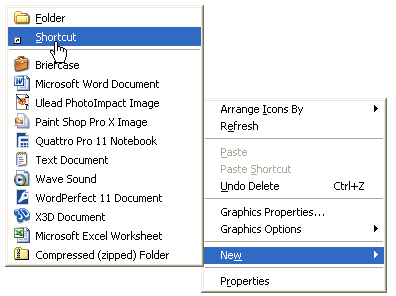
Right Click On Desktop
1. Place your cursor on an empty part of your desktop.
2. Right-click and select: New > Shortcut
3. A shortcut wizard will open up.
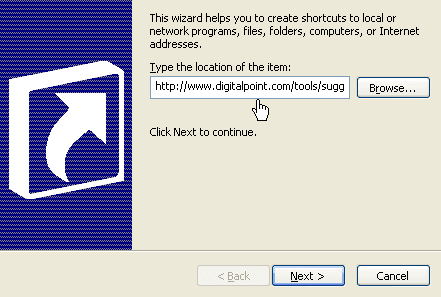
Enter Shortcut Destination
Enter the destination to the shortcut you want to create. If the destination is a website, simply enter the URL of the website or page. Click Next
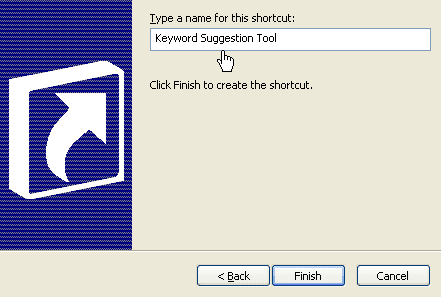
Type a Name for the Shortcut
1. Type in a name for the shortcut that will help you remember what it is for.
2. Once you have entered the new name, click finish.
Use The New Shortcut On Your Desktop!
You are already done! That’s all there is to it! Now when you want to bring up the site you visit frequently you can simply double-click on the new shortcut on your desktop!
Check out the shortcuts list on the Microsoft site at -> https://support.microsoft.com/en-us/windows/windows-keyboard-shortcuts-3d444b08-3a00-abd6-67da-ecfc07e86b98
Written by The Original PC Doctor on 14/8/2008






















































































