



Blue Screen of Death (BSOD): Causes, History & Fixes
What is the Blue Screen of Death?
The Blue Screen of Death, or BSOD, is an error screen on Windows computers. It shows up when the system has a problem it cannot fix. It’s a sign that your PC has hit a serious issue—often hardware or driver related—and has to restart to prevent damage.
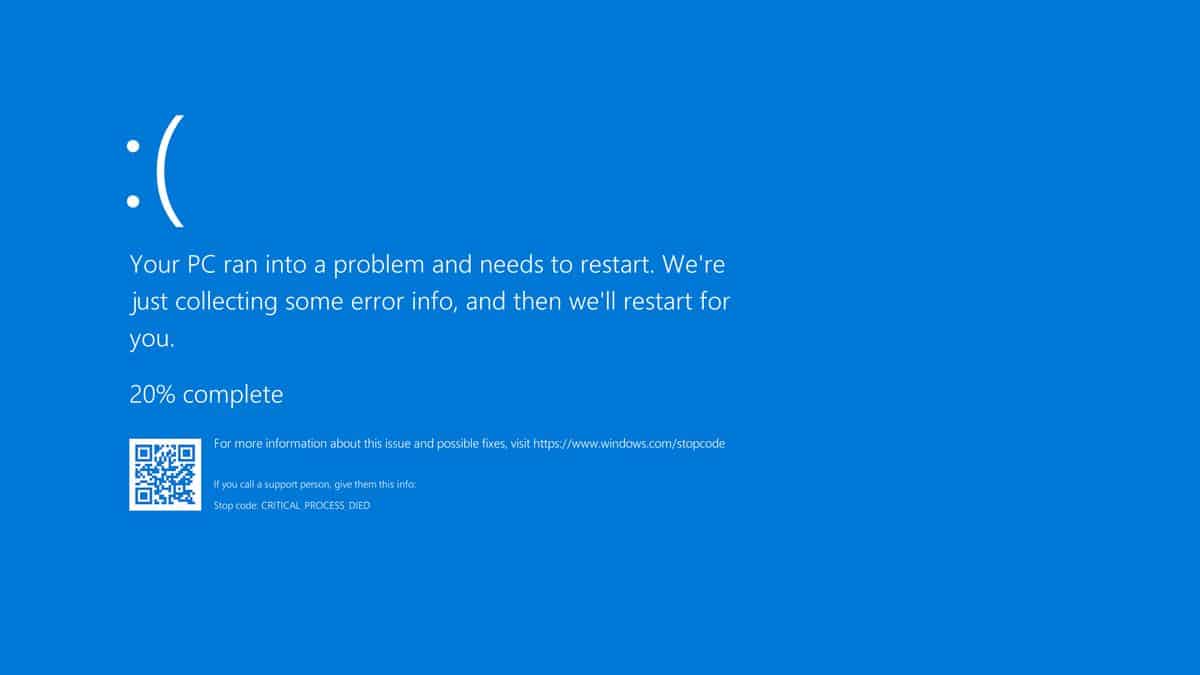
windows 10 blue screen of death
Symptoms of a Blue Screen of Death
- Sudden system crashes with a blue screen error message
- Inability to boot into the operating system
- Error codes or memory dump files displayed on the screen
- Frequent and random crashes during system operation
Self-Testing & Troubleshooting Steps
- Note down any error codes or messages displayed on the blue screen
- Attempt to boot into Safe Mode to see if the issue persists
- Check Windows Event Viewer logs for clues about the cause of the crashes
- Disconnect any new hardware to rule out conflicts
- Update drivers and Windows to the latest versions
A Brief History of the Blue Screen of Death
The BSOD first appeared in Windows 1.0 (released in 1985) as a basic error screen, but it became infamous with Windows 3.0 and especially Windows 95. Over time, it became a recognizable “panic” screen for users worldwide.
Early versions showed technical error codes and hexadecimal data, but Windows 8 and 10 later introduced a more user-friendly blue screen with a sad face and a QR code.
The Most Famous BSOD in History
The most famous Blue Screen incident happened live during Bill Gates’s demonstration at COMDEX 1998. While presenting Windows 98’s Plug and Play feature, the system crashed on stage with a BSOD, leading to laughter from the audience and a legendary tech blooper.
(You can still find this iconic fail on YouTube!)
BSOD Frequently Asked Questions (FAQ)
Q: What causes a Blue Screen of Death?
A: BSODs are usually caused by hardware faults (RAM, hard drive, graphics card), corrupt drivers, failing updates, or incompatible software.
Q: Can I fix a BSOD myself?
A: Sometimes! Try removing new hardware, updating drivers, scanning for malware, or restoring to a previous Windows state.
Q: What should I do if the BSOD keeps appearing?
A: If you can’t boot into Windows or Safe Mode, or the error persists, call a professional technician for a full diagnosis.
Q: Will I lose my data?
A: Not necessarily. Most BSODs don’t cause data loss, but repeated crashes can corrupt files. Always back up your important data!
Q: How can The Original PC Doctor help?
A: Our technicians can diagnose the cause of your BSOD, replace faulty hardware, fix driver and software issues, and get your computer running smoothly again—all onsite or remotely.
Need Help? Call Us Today!
If you’re seeing blue screens or error codes, don’t risk your data or productivity.
Contact “The Original PC Doctor” at 1300 723 628 or visit www.thepcdoctor.com.au for fast, reliable troubleshooting—onsite or remotely.






















































































