



Elevate Your Business Communication with 3CX and The Original PC Doctor
Upgrade your business with 3CX’s advanced phone system through The Original PC Doctor
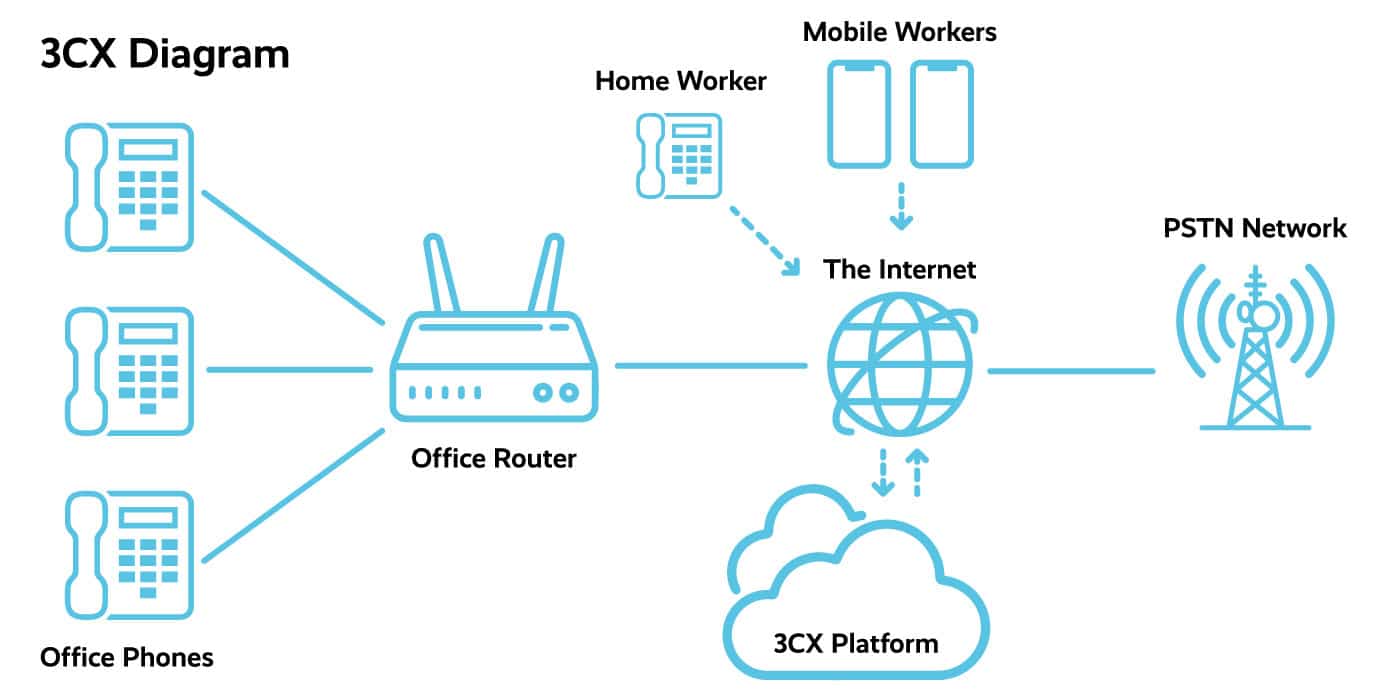
In the digital era, effective communication is the backbone of any successful business. That’s where 3CX and The PC Doctor come in. 3CX is an advanced business phone system that offers a plethora of features to revolutionize the way businesses connect, both internally and with their clients. Coupled with The PC Doctor’s expert support, integrating 3CX into your business is seamless, ensuring you maximize its potential without any hassle.
Why Choose 3CX for Your Business? Key Features of 3CX:
- Unlimited Extensions: Scale your communication needs without limits. 3CX provides unlimited extensions, accommodating your growing business needs effortlessly.
- Free Mobile App: Stay connected on the go. The 3CX mobile app enables you to make and receive calls, send texts, and access voicemail, all from your mobile device.
- Cloud-Based Efficiency: With 3CX’s cloud-based system, forget about the complexities of hardware or software installation. Enjoy a sleek, maintenance-free communication system.
- User-Friendly: 3CX is designed with all users in mind, ensuring an intuitive experience for both tech-savvy individuals and those less familiar with technological intricacies.
- Cost-Effective: 3CX provides an affordable communication solution that doesn’t compromise on quality, making it a smart choice for businesses of all sizes.
Enhanced Communication Features:
- Call Queues and Forwarding: Efficiently manage incoming calls, ensuring they’re routed to the right agents or departments, and forward calls when necessary to never miss an important conversation.
- Call Recording: Enhance training and quality assurance by recording calls, allowing for playback and review.
- Voicemail and Conference Calling: Leave no message unheard with streamlined voicemail features and bring teams together with easy-to-use conference calling.
- Video Conferencing: Facilitate face-to-face interactions remotely with 3CX’s robust video conferencing capabilities.
The PC Doctor’s Support for 3CX:
At The PC Doctor, we understand the importance of a reliable, efficient communication system. That’s why we’re proud to offer full support for 3CX Phone Systems. Our team of experts is here to help you integrate 3CX seamlessly into your business operations, ensuring you leverage all its powerful features to the fullest. From initial setup to ongoing maintenance, The PC Doctor provides comprehensive support, allowing you to focus on what matters most – growing your business.
Why Choose The PC Doctor for Your 3CX System?
- Expert Installation and Setup: Our professionals ensure your 3CX system is up and running smoothly, tailored to your specific business needs.
- Ongoing Support and Maintenance: We provide continuous support and maintenance, ensuring your system operates at peak efficiency at all times.
- Custom Solutions: The PC Doctor works with you to customize your 3CX system, ensuring it aligns perfectly with your business communication needs.
3CX, with the support of The PC Doctor, offers a powerful, versatile business phone system designed to elevate your communication capabilities. If you’re seeking a superior phone system backed by unparalleled support, look no further than 3CX and The PC Doctor. Contact us today to transform your business communication.
Discover more about 3CX and how it can transform your business communication by visiting the official 3CX website.
Contact us today to transform your business communication at 1300-723-628.
3CX FAQ
- What are the minimum requirements for 3CX?
The minimum requirements for hosting 3CX vary based on the size of the deployment, the platform it’s installed on, and whether it’s hosted on-premises, in a private cloud, or in a public cloud. Here’s a concise overview based on information from 3CX’s official documentation and Lightwire Business:
General Requirements for 3CX:
- CPU and Memory: The requirements depend on the number of users, call queues, and extension groups. Integrating with Microsoft 365 and other features may require additional RAM.
- Network: A minimum of a 1Gb LAN connection is needed, with 10Gb required for 1000 or more users.
- Storage: At least 30GB of storage space is required for the base system install, with additional space needed for backups, voicemails, logs, and call recordings.
Specific Deployment Sizes and Requirements:
- Small (up to 10 extensions): Requires at least an Intel i3 (Gen. 8) or equivalent for Linux Debian-based installations and slightly higher specifications for Windows-based installations.
- Medium (up to 50 extensions): An Intel i5 (Gen. 8) or equivalent is recommended for Linux Debian-based installations, with higher requirements for Windows.
- Large (up to 250 extensions) and Enterprise (up to 1000 extensions): These sizes require more powerful CPUs (Intel i7 for large and Intel Xeon E5 v4 for enterprise), more memory, and larger storage capacities.
Hosting on Different Platforms:
- On-premises Deployment: Can use Debian or Windows, with Windows requiring higher memory and system specifications.
- Private Cloud Deployment: Suitable for VM clusters or virtual server deployments, with hardware recommendations similar to on-prem systems.
- Public Cloud Deployment: Providers like Azure, AWS, and GCP offer resilient hosting options, with specific instance specifications recommended based on the deployment size.
It’s important to note that these are baseline requirements, and actual needs may vary based on your specific usage scenarios, including the number of simultaneous calls and active users. For deployments larger than 1000 extensions, it’s recommended to consult with 3CX directly to plan appropriately.
For detailed specifications and to ensure you’re meeting all necessary requirements for your particular setup, visiting the official 3CX documentation and Lightwire Business’s insights on hosting requirements is highly recommended.
- Why would I get 3CX? How do I know i need it?
Choosing 3CX for your business communication needs could significantly benefit your company in various ways. Here are some key reasons and considerations to help you determine if 3CX is the right choice for your business:
- Flexibility and Device Compatibility: 3CX operates on Windows, offering flexibility and compatibility with a wide range of devices, including Android and iPhones. This allows for greater connectedness across different platforms and devices your employees may use.
- Cost Savings: 3CX can help reduce your phone bills through VoIP technology, eliminating the need for traditional, expensive hardware setups. It supports web conferencing and requires no investment in proprietary hardware, potentially saving significant amounts on communication costs.
- Comprehensive Communication Features: The system includes essential business communication tools such as call logs, call recording, instant messaging, video conferencing, and Microsoft Outlook integration, facilitating seamless in-house and global communication.
- Mobile Work Flexibility: With 3CX, employees can use their office numbers on their mobile devices, enhancing mobility and flexibility. This feature is particularly useful for remote work or for employees who travel frequently.
- Integration Capabilities: 3CX can be integrated with SIP phones, PSTN, and various software applications, ensuring a smooth transition to this system with minimal disruption to your operations.
- Security and Reliability: Advanced encryption protocols and security measures are in place to protect your communications from potential threats, ensuring that conversations remain secure.
- Scalability: 3CX is easily scalable, allowing you to add new lines and users as your business grows without the need for significant additional expenses or complex hardware setups.
- Cost-Effectiveness: It’s an affordable option that enables companies to reduce office phone bills and eliminate interoffice call charges effectively. The system’s software-based approach, combined with its ability to make calls over the internet, leads to substantial cost savings.
- Support and Personalization: 3CX provides dedicated customer support and offers a highly customizable system, allowing you to tailor it precisely to your company’s unique requirements.
- Work from Anywhere: With the 3CX app for iOS and Android devices, you can take your work on the go, making and receiving calls, participating in video conferences, accessing voicemail, and collaborating with your team from anywhere with an internet connection.
- Ease of Use and Maintenance: The user-friendly interface and straightforward setup process make 3CX an attractive option for businesses looking to deploy and configure their phone system efficiently. Automatic updates ensure the system stays up-to-date with the latest features and security enhancements.
To determine if 3CX is the right solution for your business, consider your budget, the features your team needs, the number of users, compatibility with existing hardware, and your expected call volume. For businesses seeking a customizable, scalable, and cost-effective communication system, 3CX offers significant advantages, particularly for those with existing hardware, as costs can be saved by only paying for the software license.
For further details on 3CX and how it could fit into your business, consulting with a 3CX partner or a telecoms expert can provide personalized advice and help you make an informed decision.
- What platforms does 3CX support for hosting the PBX and also softphones and my Apple Watch?ChatGPTChatGPT
- What other business platforms can 3CX integrate into?
3CX integrates with a variety of CRM, ERP, or accounting systems, enhancing customer service and unifying customer information on a single platform. Key integrations developed and maintained by 3CX include Salesforce, Zendesk, Microsoft Dynamics, Freshdesk, Zoho, and more. For CRMs not directly listed, 3CX provides API support for custom integration, allowing for flexibility and customization according to specific business needs. For further details and a complete list of integrations, please visit 3CX’s official documentation on CRM integration
- How does 3CX compare to other ePBX products out there?
When comparing 3CX to other ePBX products, several key aspects and features come into play, including call management, video conferencing capabilities, CRM integrations, and overall ease of use and flexibility.
3CX stands out for its comprehensive suite of features such as video conferencing without the need for additional apps, CRM integrations with major platforms like Microsoft 365 and Salesforce, and unlimited extensions. It offers a versatile solution that can be hosted on various platforms, including Windows, Linux, and major cloud services like AWS, Google Cloud, and Microsoft Azure. For softphones, 3CX supports iOS and Android devices, providing flexibility for mobile communications. While not explicitly stated, using 3CX with Apple devices such as iPhones—which are compatible with Apple Watches—may offer indirect support and functionalities via the iOS app, like call notifications.
Comparatively, solutions like FreePBX and 8×8 have their strengths, such as FreePBX’s robust call management features and the availability of a wide range of add-ons. FreePBX is noted for its appeal in contact centre and call management capabilities due to its extensive free and paid features, despite 3CX offering a strong set of features itself, including a predictive dialer and real-time agent monitoring.
8×8 distinguishes itself with a high degree of unification in communications, presenting an all-in-one app solution that combines voice, video, chat, and more. It offers excellent mobility features allowing employees to use extensions regardless of their location and integrates well with CRM systems, ensuring that customer records are easily accessible for efficient service. Furthermore, 8×8’s video conferencing and collaboration tools are designed for ease of use and secure communication across teams and with customers.
Each of these platforms has its unique strengths and may suit different business needs based on factors like the preferred hosting environment, the necessity of specific integrations, mobility requirements, and budget considerations. It’s crucial to assess these elements relative to your business needs to determine which ePBX solution aligns best with your communication and operational requirements.
- Toggle Title
Toggle Content






















































































